
A good image can make a post feel more trustworthy, a product feel more polished, and a simple idea feel easier to understand. The problem is that most people do not have time to open a professional editing program every time a photo needs cleaning, improving, or restyling. This is why AI Photo Editor feels less like another design tool and more like a practical new habit for modern content work.
The shift is simple: instead of treating photo editing as a technical task, you can treat it as a decision-making task. What should stay? What should change? What mood should the image create? What needs to look cleaner before publishing? Once those choices are clear, AI can handle much of the execution.
Editing Starts Before The Tool Opens
The most useful way to think about this platform is not “what buttons does it have?” but “what visual problem am I trying to solve?” Most everyday image edits begin with a small frustration. The background is too messy. The product looks flat. A person or object distracts from the subject. The image is close to useful, but not quite ready.
That is where an AI-based workflow becomes valuable. It helps users move from rough image to usable image without needing to understand every manual editing technique.
The Real Job Is Choosing The Direction
Before uploading an image, the user should decide the purpose of the edit. A photo for a personal post needs a different treatment from a product image. A thumbnail needs stronger visual focus than a realistic lifestyle picture. A creative poster may welcome stylization, while a commercial product image needs accuracy.
This matters because AI photo editing works best when the instruction is clear. A vague request such as “make it better” may produce a result, but a more specific request gives the model a stronger target.
Clear Intent Produces Cleaner Results
A better approach is to define the editing goal in plain language. For example, the user might want to remove a background, erase a distracting object, enhance clarity, create a more polished product photo, or transform the original image into a new visual style.
When the goal is clear, the AI is not simply guessing. It is following a direction.
From Photo Fixing To Visual Repurposing
One important angle that many people miss is that AI editing is not only about fixing bad photos. It is also about repurposing existing images into new visual assets.
A single image can become a cleaner product shot, a social media post, a creative concept, a stylized portrait, or a starting point for a video-style visual. This makes the platform useful not only after something goes wrong, but also when someone wants more creative options from the same source material.
One Image Can Become Multiple Content Assets
For creators and small teams, this is a major advantage. Producing new visuals from scratch can be slow. But using an existing image as a base makes the process faster and more controlled.
A product photo can be tested with different backgrounds. A portrait can be turned into different visual moods. A casual image can be enhanced for a more finished look. A static image can even become part of a motion-based content workflow when image-to-video tools are involved.
Repurposing Saves Time Without Starting Over
This is especially helpful for people who constantly publish content. Social media managers, ecommerce sellers, bloggers, newsletter writers, and marketing teams often need fresh visuals more often than they need perfect museum-level edits.
AI editing gives them a way to extend the life of existing images. Instead of taking a new photo every time, they can create new versions based on the material they already have.
How The Workflow Feels In Real Use
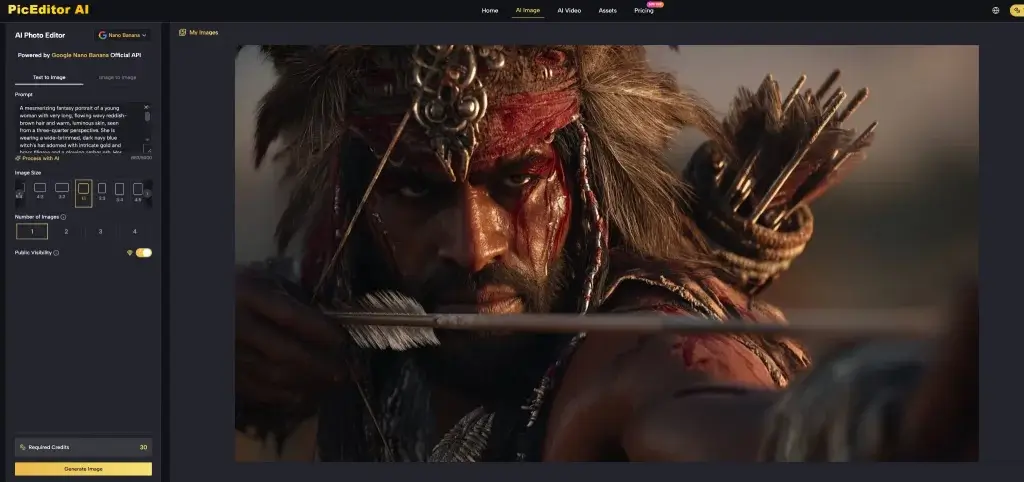
The platform’s basic flow is designed around a simple user path: upload the image, choose the editing function, describe the desired change, then generate and review the output. That structure is important because it keeps the experience accessible.
The user does not need to build masks, adjust layers, or manually paint over every area. The AI handles much of the visual processing after the user gives the instruction.
Step One Identify The Publishing Context
Before editing, decide where the image will be used. A marketplace product image, a blog header, a short-form video thumbnail, and a personal profile picture all need different visual decisions.
This first step helps prevent random editing. The goal is not to make every image look dramatic. The goal is to make the image fit its purpose.
Context Shapes The Editing Standard
For ecommerce, the image should be clean, accurate, and not misleading. For social content, the image may need stronger mood, contrast, or style. For creative experiments, the user can accept more transformation and less realism.
Knowing the context makes the prompt easier to write and the result easier to judge.
Step Two Choose The Right AI Function
After the context is clear, the user can choose the relevant editing path. The platform supports practical AI image tasks such as enhancement, background editing, object removal, image generation, and image-to-image transformation.
This means the user can handle different editing needs without switching between many separate tools.
The Tool Choice Should Match The Problem
If the issue is image quality, enhancement is the logical starting point. If the problem is a messy scene, background removal or object cleanup may be more useful. If the user wants a new creative direction, image-to-image generation can help turn the original photo into a fresh visual style.
Choosing the correct tool keeps the process efficient.
Step Three Write A Prompt Like A Creative Brief
The prompt should describe the result, not just the problem. Instead of saying “fix this,” a better prompt explains what should change and what should remain consistent.
For example, a user may ask for a cleaner background while keeping the product unchanged, a more professional portrait while preserving facial features, or a more cinematic scene while maintaining the original subject.
Good Prompts Protect Important Details
This is especially important for commercial or personal images. If a product shape, logo, face, color, or brand detail must stay accurate, the prompt should say so clearly.
AI can be powerful, but it does not automatically know which details are sacred. The user needs to guide it.
Step Four Review And Refine The Output
The generated image should be treated as a draft first. Sometimes the first result is already good enough. Other times, small problems need another prompt or a second attempt.
This review step is part of the workflow, not a failure of the tool.
Iteration Is Normal In AI Editing
AI outputs can vary, especially with complex scenes, hands, hair, reflections, text, logos, or detailed product shapes. A practical user will review the result, adjust the instruction, and generate again if needed.
This is often still faster than doing the same work manually from the beginning.
Where It Fits Into A Content Workflow
The strongest use case is not one dramatic edit. It is repeated, everyday visual production. People who make content regularly often face the same problem: they need images that look good enough to publish, but they cannot spend hours editing each one.
This is where the platform becomes more than a novelty. It can become part of a repeatable creative workflow.
For Social Media And Personal Branding
Social platforms reward visual clarity. A cleaner image often gets attention faster because the subject is easier to understand.
Creators can use AI editing to improve casual photos, create alternate styles, clean up backgrounds, or prepare images for posts, covers, and thumbnails.
Speed Supports More Experimentation
When editing becomes faster, creators can test more versions. They can compare a natural look with a polished look, a simple background with a dramatic one, or a realistic image with a stylized version.
This makes visual decision-making more flexible.
For Ecommerce And Product Presentation
Small sellers often struggle with product images. Hiring a photographer or designer for every update is not always practical, but low-quality visuals can weaken customer trust.
AI editing can help clean up product photos, improve presentation, and create more consistent visuals for online stores or social commerce.
Accuracy Must Come Before Style
For product images, the edited result should not misrepresent the item. Colors, proportions, labels, and important details need to be checked carefully.
A beautiful image is not useful if it changes what the customer is actually buying.
For Marketing And Campaign Drafting
Marketing teams often need quick visual drafts before deciding which direction to develop further. AI editing can help create early-stage concepts without spending too much time on manual production.
This is useful for landing page visuals, ad concepts, campaign mood boards, and content planning.
Drafts Can Guide Bigger Creative Decisions
Even if a final campaign still needs professional design review, AI-generated image drafts can help teams compare directions faster. They can see whether a clean product look, a lifestyle scene, or a more artistic visual angle fits the message better.
In that sense, AI editing helps with exploration as much as execution.
A Different Comparison For Real Users
Traditional image editors are powerful, but they often assume the user knows exactly how to control the software. AI editing starts from a different assumption: the user knows what they want, but may not know how to manually build it.
That difference makes the platform easier for non-designers and faster for routine tasks.
| User Need | PicEditor AI | Manual Editing Workflow |
| Clean up a casual photo | Quick prompt-based edits | Manual retouching required |
| Remove a background | AI-assisted subject separation | Selection tools and edge work |
| Create visual variations | Fast image-to-image attempts | More manual setup |
| Improve product presentation | Useful for quick polish | More precise but slower |
| Test creative styles | Easy to generate options | Requires design skill |
| Preserve exact details | Needs careful review | Stronger manual control |
| Best fit | Fast publishing and iteration | Detailed professional production |
The better choice depends on the job. For high-end retouching, manual control still matters. For everyday content work, AI editing can be much more efficient.
The Limits Are Part Of The Workflow
It is important to describe the tool realistically. AI photo editing can be impressive, but it is not perfect. Results can change depending on the uploaded image, the prompt, the selected function, and the complexity of the scene.
This is why the platform should be used with review and judgment, especially for commercial visuals.
Some Edits Need Human Judgment
Faces, logos, hands, text, product labels, and fine details should always be checked. AI may create an image that looks attractive at first glance but changes something important.
For personal creative work, that may be acceptable. For brand or product use, accuracy matters more.
The Best Results Come From A Human-AI Loop
The most reliable workflow is not “AI does everything.” It is “human sets the direction, AI generates, human reviews, then AI refines.” This loop keeps the process fast while still protecting quality.
That is the practical future of many everyday editing tasks.
A More Useful Way To Think About Photo Editing
PicEditor AI is valuable because it changes photo editing from a technical barrier into a guided creative process. It helps users improve, clean up, transform, and repurpose images without needing to master complicated software first.
Its best role is not replacing every professional workflow. Its best role is helping more people produce better visuals more often. For creators, small businesses, marketers, and everyday users, that is a meaningful shift. Photo editing becomes less about struggling with tools and more about making clear visual choices.

Cassia Rowley is the mastermind behind advertising at The Bad Pod. She blends creativity with strategy to make sure ads on our site do more than just show up—they spark interest and make connections. Cassia turns simple ad placements into engaging experiences that mesh seamlessly with our content, truly capturing the attention of our audience.