
Most free image generators offer a deeply frustrating experience for newcomers. You get a handful of generations to test your ideas, and then a strict paywall slams shut just as your creative momentum begins to build. If you have been searching for high-quality models like Nano Banana AI or simply exploring alternative tools for your projects, you already know this pain intimately. The workflow stops completely, forcing you to abandon your concepts or open your wallet before you even know if the tool suits your style. This is the exact problem that Kimg AI solves for solo creators. It gives you the necessary space to actually test concepts without asking for your credit card upfront.
I. The Real Cost of Creative Testing
- The Paywall Frustration
When you are working with zero budget, your biggest enemy is the sudden and unexpected paywall. You type in a carefully crafted prompt, hit enter, and instead of your artwork, you get a pricing table blocking your screen. This completely breaks your concentration and ruins the creative mood. You are forced to stop thinking about your design elements and start worrying about subscriptions. A true creative process requires trial and error, not constant anxiety over every single click.
- The Workflow Interruption
Testing visual ideas means making inevitable mistakes along the way. You might need ten or twenty attempts to get the lighting, composition, and character details exactly right. Most free sites punish you for these necessary iterations by draining your tiny allowance within minutes. The moment your credits run dry, you have to wait another month or abandon the project entirely. This makes it impossible to build any reliable visual style for your brand or personal portfolio.
- The Multi-Site Hassle
To bypass these strict generation limits, many creators end up juggling five different email addresses across various websites. They hop from one site to another just to generate a few extra pictures for their daily needs. This scattered approach kills your productivity and scatters your assets across the internet. You spend more time managing passwords and logins than actually bringing your ideas to life. Having everything centralized in one workspace changes how you approach design entirely.
II. A Predictable and Honest Credit System
- The 400-Credit Welcome
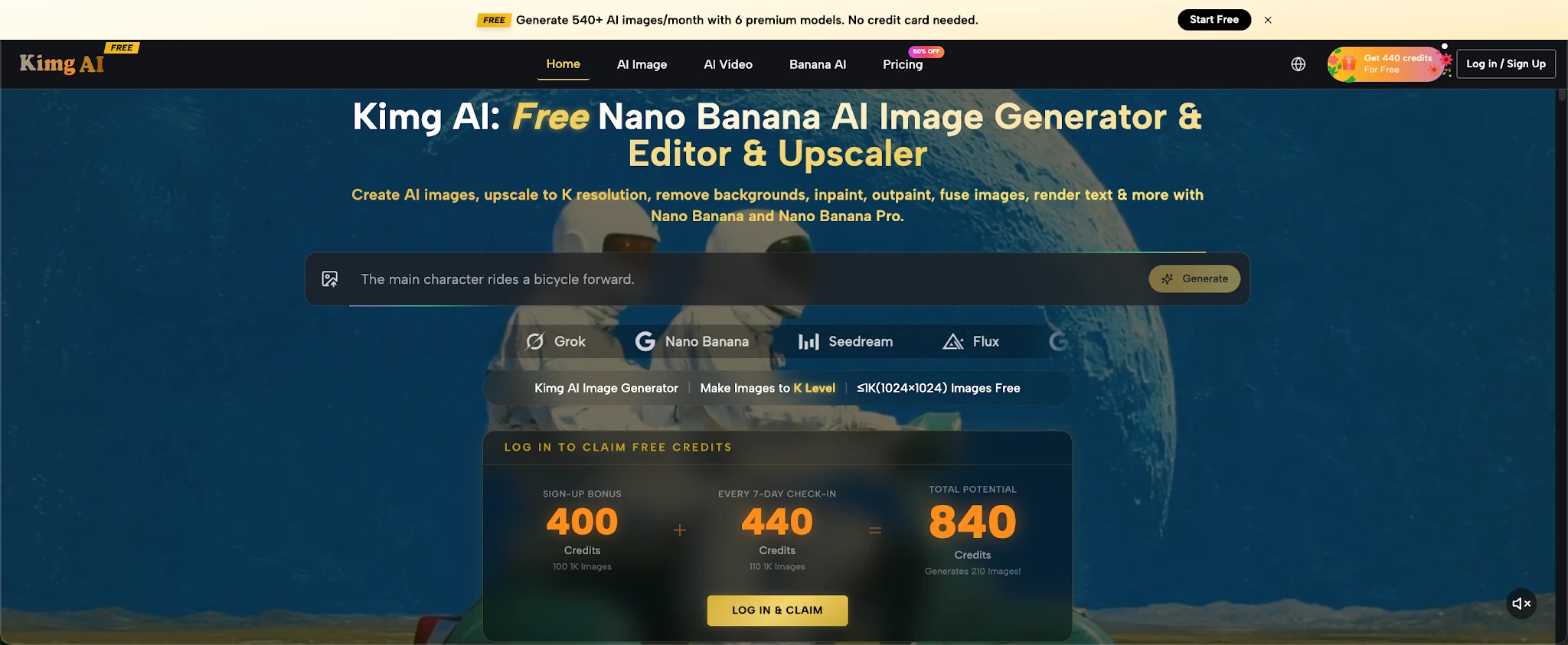
Kimg AI does not tease you with a microscopic allowance that disappears after three clicks. The moment you sign up, the site drops a generous Sign-up Bonus of 400 Credits directly into your account balance. This is an immediate, practical resource that lets you get to work immediately. You can start exploring complex prompts right away without second-guessing yourself. You do not have to hoard your credits or stress over a misspelled word ruining your only chance at a good output.
- The First Week Advantage
The momentum builds quickly if you stay consistent with your daily visits. By checking in daily for seven consecutive days, you unlock an additional 440 Credits to fuel your projects. Combining the welcome bonus with this weekly reward gives you 840 credits in your first seven days alone. That is enough to freely generate over two hundred images using high-end models, giving you massive room to experiment. You can truly learn how different prompts affect the final output.
- The Weekly 110-Image Sustainer
The support for zero-budget creators does not end after your first week of use. Kimg AI keeps your workflow alive with a continuous weekly check-in system that rewards consistency. Every subsequent week of daily check-ins yields another 440 credits for your account. This translates to about 110 free images every single week without fail. You can maintain a steady stream of content for your social media or blog without ever swiping a credit card.
III. Testing the Best Models in One Hub
- Comparing Multiple Visions
Different artistic projects require completely different visual styles and rendering techniques. Sometimes you need a hyper-realistic photograph, and other times a stylized anime illustration fits the mood better. Kimg AI hosts heavy hitters like flux, gpt image 2, and grok image all in one clean interface. You can take the exact same text prompt and run it through all these different engines to see what happens. This side-by-side comparison helps you find the perfect aesthetic without jumping between multiple tabs.
- Pushing Conceptual Boundaries
For creators looking for distinct visual flavors, having niche options like seedream provides a huge advantage in standing out. You can push your conceptual boundaries much further when you are not locked into one specific algorithm’s interpretation of your words. Switching models takes only a single click from the main dashboard. This smooth transition encourages you to play with visual textures, lighting setups, and character designs you might otherwise ignore.
- Reference Image Flexibility
Sometimes text prompts are not enough to convey your exact vision, and you need to upload reference pictures to guide the generation. The site offers incredible flexibility here depending on the specific engine you choose to activate. The base Nano Banana allows you to upload 4 reference images to steer the art direction. If you select Nano Banana Pro, that number jumps to 8, while Banana AI 2 lets you upload up to 13 reference images, giving you total, uncompromising control over the final output.
IV. Turning Static Ideas into Motion
- Staying on One Site
Creating a striking static image is often just the first step in modern content creation. Usually, animating that picture requires exporting the file, finding a completely separate video tool, and paying a brand new subscription fee. Kimg AI eliminates this tedious export process and the associated costs entirely. Your entire visual pipeline, from initial sketch to final motion graphic, happens inside the same unified workspace. This saves both time and local hard drive space.
- Activating Veo 3
Once you generate a picture you genuinely love, you can immediately turn it into a dynamic motion piece. The site integrates the powerful Veo 3 video model directly alongside its image generators for seamless access. You just select your favorite output from your gallery and pass it over to Veo 3 with a click. The motion engine analyzes your static file and adds smooth, natural movement without degrading the original composition or losing details.
- Zero Additional Cash
The absolute best part about this video integration is the straightforward payment method. You do not need to buy a separate premium currency or link a bank account to animate your work. You can use those exact same free credits you earned from signing up and checking in to run Veo 3. This means a zero-budget creator can produce professional-grade video content simply by being consistent with their daily website visits.
V. Upgrading Only When Necessary
- The Free 1K Foundation
Most people naturally fear that a free tier will only output blurry, highly compressed thumbnails that look terrible. The site respects your creative work by offering clear 1K resolution for all free generations by default. This 1K quality is perfectly sharp for social media posts, blog banners, email newsletters, and daily content needs. You can build a massive, impressive portfolio of professional-looking assets using only your weekly check-in rewards and nothing else.
- The 4K Premium Option
There is no hidden trick here; the site does have a paid tier, but it is strictly reserved for those who genuinely need it. If you land a massive commercial client or need to print your artwork on a physical billboard, you will want maximum pixel density. Members can select the 4K resolution option for their outputs to ensure ultimate crispness. This ensures that when actual money is on the line, the site can deliver flawless, commercial-grade files.
- Clear Tier Differences
This clear, honest separation of features is why the hub works so incredibly well for beginners. The free experience is not a broken demo; it is a complete, functioning workspace that lets you do real work. You only pay when your specific professional requirements outgrow the generous 1K baseline and the weekly credit allowance. Until that day comes, you can comfortably rely on your daily check-ins to fund your entire visual strategy without feeling restricted.
VI. Conclusion
Building a visual identity from scratch should not require a massive upfront financial investment or a complex web of subscriptions. The combination of a generous 400-credit welcome, ongoing weekly rewards, and immediate access to heavy-hitting models makes Kimg AI an incredibly practical workspace. You get the genuine freedom to test various artistic styles, iterate on complex prompts, and even animate your favorite pieces with Veo 3, all without touching your wallet. For any creator looking to turn raw ideas into finished reality without hitting constant paywalls, this is the most logical and supportive place to begin your creative journey.

Cassia Rowley is the mastermind behind advertising at The Bad Pod. She blends creativity with strategy to make sure ads on our site do more than just show up—they spark interest and make connections. Cassia turns simple ad placements into engaging experiences that mesh seamlessly with our content, truly capturing the attention of our audience.